AI image generation has evolved fast, but most tools still struggle with control, consistency, and realism. That’s where Nano Banana Pro stands out.
It’s not just another image model. It combines high-quality visuals, accurate text rendering, and real-time intelligence in one system. You can generate, edit, and refine images with precision—using simple prompts.
For creators, marketers, and developers, this means faster workflows and better results. From product visuals to branded content, everything becomes easier to scale.
Core Features and Capabilities
Nano Banana Pro is designed to go beyond basic image generation. It delivers precision, flexibility, and creative control in one system. Below are the key capabilities that make it stand out in 2026.
Personal Experience
I used Nano Banana Pro for 100 days before I wrote this. I did not just look at what the official website says about Nano Banana Pro. I wanted to tell you what it is, like to use Nano Banana Pro when you are working. The things I liked about Nano Banana Pro and the things that were annoying.
High-Quality Image Generation and Editing
Nano Banana Pro produces sharp, realistic visuals with strong attention to detail. Lighting, textures, and depth are handled more accurately than earlier models.
It also supports advanced editing. Instead of regenerating an entire image, you can modify specific elements. For example, you can:
- Change backgrounds without affecting the subject
- Adjust lighting or mood
- Replace or remove objects cleanly
This saves time and improves consistency across projects.
Advanced Text Rendering and Localization
One of the biggest improvements is accurate text generation inside images. Many AI tools struggle with readable typography, but Nano Banana Pro handles it well.
You can:
- Add clear, properly spelled text to designs
- Control font style and placement
- Generate content in multiple languages
This is especially useful for ads, banners, and social media creatives where text clarity matters.
Real-Time Intelligence and Web Integration
Nano Banana Pro can incorporate up-to-date information into its outputs. This allows you to create content that reflects current trends, events, or data.
For example:
- Generate visuals based on recent news themes
- Create location-based or seasonal content
- Adapt designs using live context
This makes your outputs more relevant and timely.
Multi-Image Composition and Style Transfer
The model can work with multiple references at once. You can combine elements from different images into a single, cohesive result.
Key capabilities include:
- Merging subjects from multiple images
- Applying one image’s style to another
- Maintaining visual consistency across variations
This is useful for branding, storytelling, and creative direction.
Real-Time Iterative Editing
Instead of starting over, you can refine results step by step. Each prompt builds on the previous output.
This allows you to:
- Fine-tune details gradually
- Test variations quickly
- Reach the exact result you want with fewer attempts
It creates a smoother and more controlled creative workflow.
Scalable Output Quality (Up to Production Level)
Nano Banana Pro supports high-resolution outputs suitable for professional use. You can generate images ready for:
- E-commerce listings
- Marketing campaigns
- Print materials
With proper prompting, you can scale visuals to HD or even 4K quality without losing detail.
Nano Banana Pro vs Other AI Tools
Nano Banana Pro is different from AI tools. It is hard to understand why unless you compare it to others. Ai tools are good, at just one thing. The Nano Banana Pro tool brings strengths together in one place. It helps users with tasks at once.
Where Nano Banana Pro Excels
1. Better Text Inside Images
Many AI models still produce distorted or unreadable text. Nano Banana Pro generates clean, usable typography. This makes it ideal for ads, posters, and branded content.
2. Strong Editing Capabilities
Instead of recreating images from scratch, you can edit specific parts with precision. This gives you more control and reduces rework.
3. Multi-Image Understanding
It can combine multiple references smoothly. You can blend styles, subjects, and compositions without breaking realism.
4. Real-Time Context Awareness
Unlike traditional models, it can adapt outputs based on current information. This is useful for trend-based content and timely campaigns.
5. Consistency Across Outputs
Maintaining the same character, style, or branding across multiple images is easier. This is critical for businesses and long-term projects.
Where Other Tools May Compete
Different AI tools still have strengths in specific areas:
- Some models are faster for simple image generation
- Others may be cheaper for bulk, low-quality outputs
- Certain tools specialize in niche styles (like art or anime)
However, they often lack balance across all features.
When to Choose Nano Banana Pro
Use Nano Banana Pro when:
- You need professional-quality visuals
- Your images require clear text or branding
- You want precise editing instead of regeneration
- You’re working with multiple references or styles
- Consistency across outputs is important
When to Consider Alternatives
Other tools might be a better fit if:
- You only need quick, basic images
- Budget is your primary concern
- You don’t require detailed control or editing
Getting Started (Setup & Access)
Before you begin using Nano Banana Pro, you need a basic setup. The process is simple, but choosing the right access method matters.
System Requirements
Nano Banana Pro runs primarily in the cloud. You don’t need a high-end computer.
Minimum needs:
- Stable internet connection
- Modern browser (Chrome, Edge, Safari)
- Basic understanding of prompts
For API use:
- Development environment (Node.js, Python, etc.)
- API key access
Account Setup
To get started, you’ll need an account on a supported platform.
Typical steps:
- Sign up using email or Google account
- Verify your account
- Access the dashboard or interface
- Generate or locate your API key (if needed)
Once logged in, you can immediately start generating or editing images.
Access Options (Free vs Paid)
Nano Banana Pro is usually available in multiple tiers.
Free Access
- Limited number of generations
- Lower priority processing
- Basic features only
Paid Plans
- Higher generation limits
- Faster response times
- Access to advanced features (editing, multi-image input, HD output)
If you’re just testing, the free tier is enough. For professional use, paid plans are more practical.
Where You Can Use It
Nano Banana Pro is accessible through different platforms:
1. Web Apps (Beginner-Friendly)
- Direct interface for generating images
- No coding required
- Best for creators and marketers
2. Developer Platforms (API Access)
- Integrate into apps or workflows
- Automate image generation
- Ideal for developers and businesses
3. Integrated Tools & Third-Party Apps
- Some platforms include Nano Banana Pro as part of their workflow
- Useful for design, content creation, and automation
Quick Start Workflow
Here’s a simple way to begin:
- Log in to your chosen platform
- Enter a clear prompt (describe what you want)
- Generate the image
- Refine using follow-up prompts or editing tools
- Export or download the final result
This basic loop—prompt → generate → refine—is the foundation of working with Nano Banana Pro.
Pro Tip for Beginners
Start simple. Avoid complex prompts at first.
Focus on clarity, then gradually add details like lighting, style, and composition.
How Prompting Works (Fundamentals)
Prompting is the core skill behind getting great results from Nano Banana Pro. The model follows your instructions closely—but only if those instructions are clear and structured.
The Structure of an Effective Prompt
A strong prompt usually includes four key elements:
1. Subject
What is the main focus?
Example: a luxury perfume bottle
2. Context or Scene
Where is it placed? What’s happening?
Example: on a marble table with soft morning light
3. Style and Visual Details
How should it look?
Example: cinematic lighting, shallow depth of field, ultra-realistic
4. Technical or Output Hints
Optional but useful for quality
Example: 4K, high detail, product photography
Simple Formula:
Subject + Context + Style + Quality
Using Clear and Descriptive Language
Avoid vague prompts like:
- “Make a nice image”
- “Cool design of a product”
Instead, be specific and visual:
- Describe colors, lighting, mood, and angle
- Mention materials and textures
- Use real-world references when possible
The clearer your input, the better the output.
Adding Visual Direction
Think like a photographer or designer. Include details such as:
- Camera angle (top view, close-up, wide shot)
- Lighting (soft light, studio lighting, neon glow)
- Mood (dark, vibrant, minimal, luxury)
Example:
A close-up shot of a gold watch, studio lighting, black background, high contrast
Iterative Prompting (Refinement Method)
You don’t need a perfect prompt on the first try. Improve results step by step:
- Start with a basic prompt
- Generate the image
- Add details or fix issues in the next prompt
Example workflow:
- First: a sneaker on a street
- Next: add neon lighting and rain reflections
- Final: increase detail, cinematic lighting, ultra-realistic
Each step improves the result without starting over.
Common Beginner Mistakes
1. Being Too Vague
Leads to generic or unexpected results
2. Overloading the Prompt
Too many instructions can confuse the model
3. Ignoring Composition
Not specifying angle or layout reduces control
4. No Iteration
Trying to get perfect results in one attempt
Balance Between Detail and Simplicity
A good prompt is detailed—but not cluttered. Focus on what matters most:
- Main subject
- Key visual elements
- Desired style
You can always refine later.
Quick Example (Before vs After)
Weak Prompt:
A product image
Strong Prompt:
A premium skincare bottle on a marble surface, soft natural lighting, minimal background, luxury aesthetic, ultra-realistic, 4K
Advanced Prompting Techniques
Once you understand the basics, advanced prompting helps you gain full creative control. These techniques are used by professionals to produce consistent, high-quality results.
Using Camera Language for Precision
Think like a photographer. The more specific your visual direction, the better the output.
Key elements to include:
- Shot type: close-up, wide shot, macro
- Angle: top-down, eye-level, low angle
- Lens feel: depth of field, background blur
- Lighting: soft light, studio light, golden hour
Example:
A low-angle shot of a sports car, golden hour lighting, shallow depth of field, cinematic look
This approach improves realism and composition instantly.
Storytelling Through Prompts
Instead of describing objects, describe a scene or moment. This adds depth and emotion.
Focus on:
- Environment
- Action or context
- Mood
Example:
A young traveler standing on a rainy street in Tokyo at night, neon lights reflecting on the ground, cinematic atmosphere
Story-driven prompts produce more engaging and natural results.
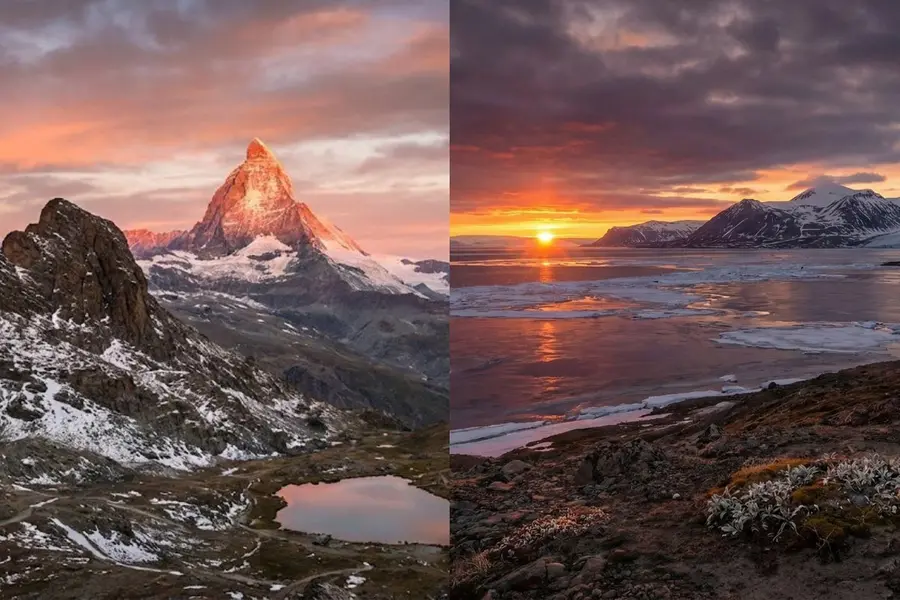
Multi-Step Prompt Refinement
Professionals rarely rely on one prompt. They refine outputs step by step.
Workflow:
- Generate a base image
- Identify what needs improvement
- Add targeted instructions
Examples of refinements:
- “increase realism and texture detail”
- “make lighting softer and more natural”
- “adjust background to a minimal studio setup”
This method gives you precise control without starting over.
Maintaining Character Consistency
Consistency is crucial for branding, storytelling, or repeated visuals.
To maintain it:
- Reuse key descriptors (face, clothing, colors)
- Mention defining traits clearly
- Use reference images when possible
Example:
A female character with short black hair, wearing a red jacket, same facial features, consistent style
Keeping these details stable ensures similar outputs across multiple generations.
Layering Instructions (Priority-Based Prompting)
Structure your prompt in layers, from most important to least important.
Order:
- Main subject
- Scene/context
- Style
- Technical details
This prevents the model from misinterpreting your intent.
Controlling Style and Aesthetics
You can guide the visual style precisely by specifying:
- Art style (realistic, cinematic, minimal, vintage)
- Color tone (warm, cool, monochrome)
- Inspiration (film-like, studio photography, editorial look)
Example:
A fashion portrait, editorial magazine style, soft lighting, neutral tones
Combining Multiple References
Advanced users often merge ideas or images.
You can:
- Blend two styles (e.g., modern + vintage)
- Combine subjects from different prompts
- Apply one image’s style to another
Be clear about what each element contributes.
Avoiding Over-Complex Prompts
More detail doesn’t always mean better results. Too many instructions can conflict.
Best practice:
- Start focused
- Add complexity gradually
- Remove unnecessary details
Quick Advanced Prompt Example
A close-up portrait of a luxury watch on a marble surface, soft studio lighting, shallow depth of field, reflections visible, high-end product photography, ultra-realistic, 4K
Five Key Prompting Frameworks
To get consistent, high-quality results, it helps to follow structured prompting frameworks. These frameworks act like templates. They reduce guesswork and improve output quality across different tasks.
1. Image Generation Framework
This is the most commonly used structure. It focuses on creating visuals from scratch.
Framework Structure:
Subject + Scene + Style + Lighting + Quality
How to Use:
- Define the main subject clearly
- Add environment or background context
- Specify visual style and mood
- Include lighting details
- Add quality hints like HD or 4K
Example:
A luxury perfume bottle on a marble table, soft natural lighting, minimal background, cinematic style, ultra-realistic, 4K
2. Image Editing Framework
This framework is used when modifying an existing image instead of generating a new one.
Framework Structure:
Target Element + Action + Constraints + Style Match
How to Use:
- Identify what needs to change
- Specify the exact action (remove, replace, enhance)
- Add constraints (keep lighting, preserve background)
- Maintain overall style consistency
Example:
Replace the background with a beach scene, keep the subject unchanged, match lighting and shadows, maintain realistic style
3. Real-Time Data Prompting Framework
This is useful for generating content based on current trends or live information.
Framework Structure:
Topic + Context + Time Relevance + Output Style
How to Use:
- Mention the subject or trend
- Add context (event, season, location)
- Include time relevance (current, recent, trending)
- Define the visual style
Example:
A modern social media graphic about current summer fashion trends, vibrant colors, clean layout, minimal design
4. Text Rendering & Localization Framework
Use this when your image includes text that must be readable and accurate.
Framework Structure:
Design Type + Exact Text + Placement + Style
How to Use:
- Define the type of design (poster, ad, banner)
- Provide exact text (no ambiguity)
- Specify placement (center, top, overlay)
- Add font or style direction
Example:
A promotional banner with the text “Summer Sale 50% Off” centered, bold modern font, clean layout, bright colors
5. Creative Direction Framework
This is a high-level approach used by professionals. It focuses on vision rather than just instructions.
Framework Structure:
Concept + Emotion + Visual Style + Key Elements
How to Use:
- Start with a clear idea or concept
- Define the emotional tone
- Guide the overall aesthetic
- Highlight important visual elements
Example:
A high-end fashion campaign, elegant and minimal mood, soft lighting, neutral tones, focus on luxury and sophistication
How to Choose the Right Framework
- Use Image Generation for creating new visuals
- Use Image Editing for modifying existing images
- Use Real-Time Framework for trend-based content
- Use Text Framework when typography matters
- Use Creative Direction for branding and storytelling
Practical Use Cases
Nano Banana Pro is not just a creative tool—it solves real-world problems across industries. Below are some of the most effective ways professionals are using it in 2026.
E-commerce Product Visualization
Creating product images is expensive and time-consuming. Nano Banana Pro simplifies this process.
You can:
- Generate high-quality product photos without a physical shoot
- Test multiple backgrounds, lighting styles, and angles
- Create consistent visuals for entire catalogs
Example Use:
A skincare brand can generate clean, luxury-style product shots on marble surfaces with soft lighting—ready for online stores.
Marketing and Advertising Content
Marketing teams need fresh visuals constantly. Nano Banana Pro helps create them quickly.
Common applications:
- Social media posts and ad creatives
- Promotional banners with clear text
- Campaign visuals in different styles
Benefit:
You can produce multiple variations of the same concept for A/B testing without extra cost.
Branding and Identity Design
Consistency is key in branding. Nano Banana Pro helps maintain a unified visual style.
You can:
- Generate brand-aligned visuals repeatedly
- Apply consistent colors, lighting, and tone
- Create assets like logos, banners, and visuals
Example Use:
A startup can create a full set of branded graphics without hiring a large design team.
Educational and Blog Content
Visuals improve engagement and understanding. Nano Banana Pro makes it easy to generate them.
Use cases include:
- Blog illustrations
- Infographics with readable text
- Concept visuals for explanations
Benefit:
Content becomes more engaging and easier to understand, increasing reader retention.
Real Estate and Interior Design
Visualization is critical in property and design industries.
You can:
- Create staged interiors without physical setup
- Experiment with different furniture styles
- Show before-and-after transformations
Example Use:
A real estate agent can present multiple design options for the same space to attract buyers.
Creative Projects and Storytelling
Artists and creators can use Nano Banana Pro for storytelling and concept creation.
Applications:
- Character design and scene creation
- Comic-style visuals
- Concept art for games or films
Benefit:
You can quickly turn ideas into visual concepts without long production cycles.
Rapid Prototyping for Businesses
Businesses can visualize ideas before investing in production.
You can:
- Create mockups for products
- Test packaging designs
- Present concepts to clients
Example Use:
A company can preview multiple packaging styles before finalizing manufacturing.
Professional Workflow for High-Quality Outputs
Creating professional visuals with Nano Banana Pro is not about a single prompt. It’s a structured process. A clear workflow helps you get consistent, production-ready results every time.
Step 1: Define the Objective
Start with clarity. Know exactly what you want to create.
Ask:
- What is the purpose? (ad, product image, blog visual)
- Who is the audience?
- What style fits the brand?
A clear objective prevents random outputs and saves time.
Step 2: Build a Strong Base Prompt
Create a clean, focused prompt using fundamentals:
- Subject
- Scene
- Style
- Lighting
Example:
A premium skincare bottle on a marble surface, soft natural lighting, minimal background, luxury aesthetic
Keep it simple at first. Avoid overloading details.
Step 3: Generate and Evaluate
Run the first output and analyze it carefully.
Check:
- Composition and framing
- Lighting accuracy
- Realism and texture
- Alignment with your goal
Don’t expect perfection. This step is for direction, not final results.
Step 4: Refine Iteratively
Now improve the image step by step.
Add targeted instructions like:
- “increase sharpness and texture detail”
- “make lighting softer and more natural”
- “adjust background to a clean studio look”
Each iteration should fix a specific issue.
Step 5: Enhance for Production Quality
Once the base looks good, focus on final quality.
Enhancements include:
- Increasing resolution (HD/4K)
- Improving fine details
- Ensuring clean edges and textures
This step prepares the image for real-world use.
Step 6: Maintain Consistency Across Variations
If you need multiple images:
- Reuse the same core prompt
- Keep key descriptors consistent
- Only change small elements (angle, color, variation)
This ensures a uniform look across all visuals.
Step 7: Export and Optimize
Before using the image:
- Choose the right format (PNG, JPEG, etc.)
- Optimize size for web or print
- Double-check text clarity and details
Example: Product Image Workflow
Scenario: Skincare Product
Initial Prompt:
A luxury skincare bottle on a marble surface, soft lighting, minimal background
Refinement 1:
add subtle shadows, increase realism, improve reflections
Refinement 2:
studio lighting, ultra-realistic texture, high-end product photography
Final Output:
High-resolution, polished product image ready for e-commerce.
Scaling to HD and 4K Outputs
For professional use:
- Always mention quality in the final prompt (HD, 4K)
- Focus on lighting and texture realism
- Avoid cluttered scenes to maintain clarity
Higher resolution works best when the base image is already strong.
Pro Tip: Think Like a Creative Director
Don’t just describe—direct.
- Visualize the final output before prompting
- Guide the model with clear intent
- Refine until it matches your vision
Performance Optimization & Cost Control
Using Nano Banana Pro efficiently is not just about quality—it’s also about speed and cost. Without optimization, you can waste credits, increase latency, and slow down workflows. This section focuses on practical ways to stay efficient.
Reducing Latency (Faster Results)
Latency depends on prompt complexity, resolution, and server load.
Ways to improve speed:
- Use simpler prompts for initial generations
- Start with lower resolution, then upscale later
- Avoid unnecessary multi-image inputs
- Generate fewer variations per request
Tip: Build your base image quickly, then refine only the final version in high quality.
Optimizing Prompt Efficiency
A well-structured prompt reduces retries and wasted generations.
Best practices:
- Be clear and specific (avoid vague inputs)
- Focus on key elements instead of overloading details
- Use proven prompt structures (from earlier frameworks)
Result: Fewer attempts, better outputs, lower cost.
Managing API Usage Smartly
If you’re using the API, usage control becomes critical.
Strategies:
- Limit the number of outputs per request
- Use caching to avoid duplicate generations
- Track usage metrics regularly
- Set limits for automated systems
This prevents unnecessary spending, especially at scale.
Batching and Queueing Requests
For high-volume workflows:
- Batch similar requests together
- Use queues to manage traffic spikes
- Schedule non-urgent tasks during off-peak times
This improves performance and avoids rate limits.
Choosing the Right Resolution
Higher resolution = higher cost and slower processing.
Recommended approach:
- Prototype in standard resolution
- Finalize in HD or 4K only when needed
This keeps costs under control without sacrificing final quality.
Reducing Iterations
Too many refinements can increase cost quickly.
How to reduce iterations:
- Plan your prompt before generating
- Use structured frameworks
- Fix multiple issues in a single refinement step
Cost-Saving Techniques for Teams
If you’re working in a team or business:
- Create prompt templates for repeated tasks
- Standardize styles to avoid trial-and-error
- Share successful prompts across the team
Consistency reduces wasted credits.
Monitoring and Analytics
Always track performance and usage.
Key things to monitor:
- Number of generations
- Average response time
- Cost per image
- Error rates
This helps you identify inefficiencies early.
Common Cost Mistakes to Avoid
- Generating high-resolution images too early
- Running too many variations without purpose
- Using overly complex prompts
- Not reusing previous outputs
Common Errors and Fixes
Even with a powerful tool like Nano Banana Pro, results are not always perfect. Most issues come from unclear prompts, poor structure, or unrealistic expectations. The good news is that these problems are easy to fix once you understand them.
1. Blurry or Low-Quality Images
Problem:
Images look soft, lack detail, or appear unrealistic.
Causes:
- Missing quality instructions
- Weak lighting or style description
- Generating directly in low detail
Fix:
- Add terms like ultra-realistic, high detail, sharp focus
- Specify lighting clearly (studio, natural, cinematic)
- Generate a base image, then refine with detail enhancements
2. Incorrect or Distorted Text
Problem:
Text inside images appears misspelled or unclear.
Causes:
- Vague text instructions
- Overly complex layouts
- Missing placement guidance
Fix:
- Provide exact text in quotes
- Keep layout simple
- Specify position (center, top, label area)
Example:
Add text “Summer Sale 50% Off” in bold font, centered, clean layout
3. Inconsistent Characters or Objects
Problem:
The same subject looks different across multiple images.
Causes:
- Missing consistent descriptors
- Changing prompts too much between generations
Fix:
- Repeat key traits (appearance, colors, style)
- Keep the base prompt stable
- Only modify small elements
4. Poor Composition or Framing
Problem:
The image feels unbalanced or awkward.
Causes:
- No camera or angle instructions
- Lack of scene structure
Fix:
- Add camera direction (close-up, wide shot, top view)
- Mention composition (centered, minimal background)
5. Overly Complex or Confusing Outputs
Problem:
The result looks messy or doesn’t follow instructions.
Causes:
- Too many conflicting details
- Overloaded prompts
Fix:
- Simplify the prompt
- Focus on the most important elements
- Add complexity gradually
6. Unrealistic Lighting or Shadows
Problem:
Lighting looks unnatural or inconsistent.
Causes:
- No lighting guidance
- Mixing incompatible styles
Fix:
- Clearly define lighting type (soft, studio, golden hour)
- Keep lighting consistent with the scene
7. Background Issues
Problem:
Background distracts from the subject or looks out of place.
Causes:
- No background instructions
- Too many elements in the scene
Fix:
- Specify background style (minimal, blurred, solid color)
- Keep it simple for product or focused visuals
8. Too Many Iterations Without Improvement
Problem:
You keep generating new images but results don’t improve.
Causes:
- Random prompt changes
- No clear refinement strategy
Fix:
- Identify the exact issue before refining
- Use targeted instructions (e.g., fix lighting, improve texture)
- Avoid starting from scratch every time
9. Mismatch Between Expectation and Output
Problem:
The result doesn’t match what you imagined.
Causes:
- Vague or incomplete prompts
- Missing context or style direction
Fix:
- Be more descriptive
- Add references (style, mood, environment)
- Think visually when writing prompts
Conclusion
Nano Banana Pro brings together image generation, editing, and intelligent control in a single system. When used correctly, it can produce professional-quality visuals for business, marketing, and creative work without traditional design barriers. The key to getting the best results is not just the tool itself, but how clearly and strategically you communicate with it. With structured prompting, iterative refinement, and smart workflow practices, you can consistently turn simple ideas into polished, production-ready images.

James Eco is an AI tools researcher and content
creator with 3+ years of experience testing and
reviewing AI tools for creators and businesses.
At Get AI Craftly, he provides honest, hands-on
reviews to help readers choose the best AI tools.